Product Description:
This is an app from Curious Hat. The app is designed to visually and numerically teach students about fractions. This app allows students to compare, add, subtract, multiply, and divide fractions. The app walks students through the process to allow them to learn each step as they go. While going through these steps students are encouraged to calculate the information on their own, but does offer help if students struggle with the calculations.
Glitchy Review:
I have used this app sporadically in my classroom mainly focusing on my RSP and low performing students when we learn about dividing fractions. This app allows these students to visually see this information when most of them have auditory processing issues or retention issues. The app has allowed me to access their strengths to really allow them to learn the information. I am able to go back to 4th and 5th-grade skills within the app. The students were able to become successful with this where if I did this a different way would have been longer and harder on me and the students. While this app is very basic in its set-up it works for these students. There are no crazy bells and whistles for the students to get distracted and keeps them focused enough with just the right amount of interaction. Hands down the best part of this app would have to be the visuals for the students. They are able to see the fraction in pieces and bars; which when you get to ratios REALLY helps to transfer the skill sets. I cannot express how happy my students were to be able to FINALLY understand fractions and how to use the steps correctly. They were able to master on the app and feel confident enough to do it on their own. This app is best for lower grades introducing fractions as well as low performing students in the upper grades, not so much for students outside of this group. (Trust me I have tried.) All of this is great for teachers; on top of that, it is FREE! Enjoy!
User Rating:
This app would be a level 1 since figuring out how to use this is basic and the set-up is the same no matter what you are doing in the app.
Glitchy Rating:
I give this app a 5 for the ease of use as well as the drastic amounts of help for the students.
Feel free to leave comments or suggestions below!
Showing posts with label the future of teaching. Show all posts
Showing posts with label the future of teaching. Show all posts
Saturday, May 6, 2017

Saturday, April 22, 2017
Spiral UPDATES!
I know I have done a review on Spiral already; however, they have made some changes that I must talk about. I want to make sure my readers know all of the things I have learned so here are some of the new things going on with Spiral.
Let’s start with the Quickfires:
First, they have added the ability to create planned Quickfires where you can pre-write the questions in (which they had before) but now you can also opt for quick. Quick Quickfires are where your students are still able to answer your questions, but you DO NOT have to pre-plan them. You can verbally state them and the students can type their answers just as with a traditional Quickfire. The program does require you still title your Quickfire (which is not bad) but gives you the ability to get students to answer questions ACTIVELY in class without having to stop the class to create this. Yeay!
Second, the Quickfire now offers a canvas answer feature! I really didn’t know how to use these Quickfires for math and now I can! The drawing features are the same as Paint or Google Drawing just in smaller and not as many bells and whistles. All you need to as the teacher is change the answer format next to your question! Great update for Spiral!
If these changes weren’t good enough then let me introduce you to Clip.
Clip is a different type of discussion or quickfire (whichever you wish to use). With clip you just start the clip and you are taken to a screen where you can automatically search Youtube videos to show your students to spark debates or discussions. Now I do know as teachers we will still need to pre-watch these videos to make sure they are school appropriate, but it does produce a still of the video so you can go directly to the one you want. You can add multiple videos to your clip as well. Once you have set this up you will be given the option of an open-ended question or a multiple choice question. While in the actual Clip you can choose to hide or show answers. My students preferred to have the answers hidden because it made the clip take up the whole screen and easier for them to see it. Clip does have an extension you can add to chrome. I have not tried it because I prefer to access this from their website it does sound promising.
Finally, they have added a teacher only buying option! You no longer have to try to convince your admin to purchase this product! You can buy it for your classroom for $29 a year! While this is still in the beginning stages it is exciting!
As a teacher, I am really happy with these changes and additions. I can now use Spiral in numerous new ways in my classroom. While I do know some of you teachers do not have a 1-to-1 classroom, but please remember the students can use their phones or tablets as well. I have used this product whole class as well as in small groups with the same benefits.
If you have any comments or ideas please feel free to leave them in the comments below! Enjoy!
Let’s start with the Quickfires:
First, they have added the ability to create planned Quickfires where you can pre-write the questions in (which they had before) but now you can also opt for quick. Quick Quickfires are where your students are still able to answer your questions, but you DO NOT have to pre-plan them. You can verbally state them and the students can type their answers just as with a traditional Quickfire. The program does require you still title your Quickfire (which is not bad) but gives you the ability to get students to answer questions ACTIVELY in class without having to stop the class to create this. Yeay!
Second, the Quickfire now offers a canvas answer feature! I really didn’t know how to use these Quickfires for math and now I can! The drawing features are the same as Paint or Google Drawing just in smaller and not as many bells and whistles. All you need to as the teacher is change the answer format next to your question! Great update for Spiral!
If these changes weren’t good enough then let me introduce you to Clip.
Clip is a different type of discussion or quickfire (whichever you wish to use). With clip you just start the clip and you are taken to a screen where you can automatically search Youtube videos to show your students to spark debates or discussions. Now I do know as teachers we will still need to pre-watch these videos to make sure they are school appropriate, but it does produce a still of the video so you can go directly to the one you want. You can add multiple videos to your clip as well. Once you have set this up you will be given the option of an open-ended question or a multiple choice question. While in the actual Clip you can choose to hide or show answers. My students preferred to have the answers hidden because it made the clip take up the whole screen and easier for them to see it. Clip does have an extension you can add to chrome. I have not tried it because I prefer to access this from their website it does sound promising.
Finally, they have added a teacher only buying option! You no longer have to try to convince your admin to purchase this product! You can buy it for your classroom for $29 a year! While this is still in the beginning stages it is exciting!
As a teacher, I am really happy with these changes and additions. I can now use Spiral in numerous new ways in my classroom. While I do know some of you teachers do not have a 1-to-1 classroom, but please remember the students can use their phones or tablets as well. I have used this product whole class as well as in small groups with the same benefits.
If you have any comments or ideas please feel free to leave them in the comments below! Enjoy!
Saturday, March 4, 2017
TimeMap
Product Description:
This website allows the reader to visually see the world history. The website contains "TimeMaps" which are a combination of an encyclopedia and atlas. This allows students to see all the different historic events happening at the same time around the world.
Glitchy Review:
I stumbled on this website a few months ago and to be honest I don't remember how. I remember thinking this is a great resource! As time went on I would teach a part of history and then go "Oh! I forgot to use this!" Oh how I wish I would have remembered. When I finally did remember and show my students this website you should have heard the "OHS!" coming through the room! You know that amazing teacher moment when the students finally get the clear understanding and everything finally makes sense! That amazing moment that we as teachers strive for! I was so happy to have done this; I kick myself for not doing this sooner. The best part of this website is the thought, research, and dedication put into this website is astounding. Reading about the history of this website and how each of the maps are made is interesting within itself. There really was thought put into how this will and does benefit the student. How this can work for the teacher in their classroom and what they can do to make it better.
This website offers so much more to the user than any book or activity could. It has lessons for the teachers as well as articles for the students on topics pertaining to each map. While most of these great features are free, there are things you would have to pay for. For example, there are interactive maps which you can buy and download to your iPhone or iPad which allow for even more detail that what is available on the website. I could go on and on, however I believe you should go check it out for yourself. Click here to go check this out.
User Rating:
This is easily a level 1 website for any user. While adding the apps will take using of an iPad or iPhone into play, but the actual app is very user friendly.
Glitchy Rating:
I give this website a 4 out of 5 simply because finding the lessons and apps can get a bit confusing but easy for even a novice tech user to figure out.
Just a few pictures to show you what I am talking about!
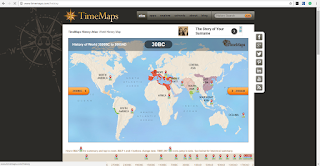

This website allows the reader to visually see the world history. The website contains "TimeMaps" which are a combination of an encyclopedia and atlas. This allows students to see all the different historic events happening at the same time around the world.
Glitchy Review:
I stumbled on this website a few months ago and to be honest I don't remember how. I remember thinking this is a great resource! As time went on I would teach a part of history and then go "Oh! I forgot to use this!" Oh how I wish I would have remembered. When I finally did remember and show my students this website you should have heard the "OHS!" coming through the room! You know that amazing teacher moment when the students finally get the clear understanding and everything finally makes sense! That amazing moment that we as teachers strive for! I was so happy to have done this; I kick myself for not doing this sooner. The best part of this website is the thought, research, and dedication put into this website is astounding. Reading about the history of this website and how each of the maps are made is interesting within itself. There really was thought put into how this will and does benefit the student. How this can work for the teacher in their classroom and what they can do to make it better.
This website offers so much more to the user than any book or activity could. It has lessons for the teachers as well as articles for the students on topics pertaining to each map. While most of these great features are free, there are things you would have to pay for. For example, there are interactive maps which you can buy and download to your iPhone or iPad which allow for even more detail that what is available on the website. I could go on and on, however I believe you should go check it out for yourself. Click here to go check this out.
User Rating:
This is easily a level 1 website for any user. While adding the apps will take using of an iPad or iPhone into play, but the actual app is very user friendly.
Glitchy Rating:
I give this website a 4 out of 5 simply because finding the lessons and apps can get a bit confusing but easy for even a novice tech user to figure out.
Just a few pictures to show you what I am talking about!


Friday, December 23, 2016
Reading Posts
Thank-you for reading my blog! I wanted to give you a heads up about how to read my posts. First, I will title each post with the product I will be talking about. Each post will include a description of the product and what it does. I will then go into my review of the product and how it will benefit the classroom. Second, I will give the product a rating between 1-5 as well as a user rating. The user rating will be the level of technology expertise you will need in order to effectively use the product. The user ratings will look as follows:
- Level 1= New User this is the easiest level where you can go in and immediately use the product no real training need just play around with it.
- Level 2= Experienced User this level you COULD go in and start using the product, however to really use all the great features will require watching a video or two.
- Level 3= Expert User this product level requires videos to fully use the product to it's complete ability. This level can be difficult for New User Teachers.
Finally, I will attach videos I have created to aid you in using the product or videos I believe best show you how to use the product. If possible I will add student samples to the post from my classroom for you to view.
Thank-you! Happy Holidays!
The Glitchy Teacher
Subscribe to:
Posts (Atom)